Lolyta: A Timeless Script Font for Creative Design
There I was, staring at a blank brand board, trying to find the right visual voice for a small, independent café looking to refresh its identity. The client wanted something warm, inviting, and slightly whimsical—something that felt personal but still professional. After testing a few options, I landed on Lolyta, a script font that immediately caught my eye with its elegant flow and distinct personality.
The Visual Character of Lolyta
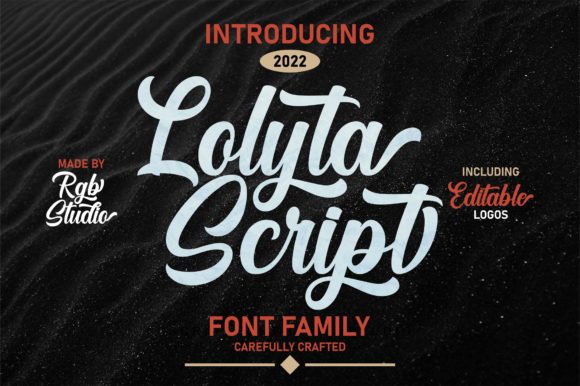
Lolyta is a beautiful script font that exudes a timeless charm. Its curves are soft yet deliberate, and each letter carries a sense of movement that feels almost hand-drawn. The font has a natural, organic feel that doesn’t lean too heavily into any one style—no excessive flourishes or overly formal shapes. It’s got just enough character to stand out without being distracting, making it a versatile choice for a variety of design projects.
When I first tested Lolyta on a logo concept, I was struck by how it balanced playfulness with sophistication. It didn’t feel too casual for a professional brand, nor did it come off as stiff or rigid. The font had a unique energy that made it feel fresh and modern while still maintaining a classic appeal.
Testing Lolyta in Real-World Branding
I used Lolyta across several elements of the café’s brand system, from the logo to the packaging mockups and social media graphics. On a business card, it added a touch of elegance without overwhelming the design. In a website header, it provided a strong visual anchor that drew attention without competing with the rest of the layout.
One of the most interesting aspects of Lolyta was how it performed on a product label. The font’s subtle swashes and ligatures gave it a refined look that worked well with a minimalist design. It also paired beautifully with a simple serif font, creating a clean and cohesive type hierarchy that felt intentional and polished.
In a social media layout, Lolyta stood out as a strong headline font. It had enough detail to make an impact but remained readable even at smaller sizes. I found it especially effective when used in combination with a bold sans serif for body text, allowing the font to shine as a focal point without becoming a distraction.
Strengths and Limitations of Lolyta
Lolyta excels as a display font, particularly in logo design, editorial layouts, and web headers. Its expressive nature makes it ideal for short phrases, headlines, and branding elements where visual interest is key. It’s not designed for long paragraphs or small text, so it’s best suited for use as a primary or accent font rather than a body typeface.
That said, there are some limitations to consider. Lolyta may not be the best choice for formal corporate branding, where a more neutral or structured font might be preferred. It also requires careful pairing to avoid clashing with other design elements. When used in isolation, it can sometimes feel a bit too stylized for certain contexts.
For a project like the café, however, these characteristics were exactly what we needed. The font helped create a brand identity that felt authentic and approachable, which aligned perfectly with the client’s vision.
Practical Tips for Using Lolyta
If you’re considering using Lolyta in your next project, start by testing it in a few different contexts. Try it on a logo draft, a packaging mockup, and a website header to see how it performs in various scales and settings. Pay attention to how it interacts with other fonts and design elements, and don’t be afraid to experiment with spacing and alignment to achieve the best results.
When pairing Lolyta with other fonts, look for complementary styles that enhance its strengths. A simple serif or sans serif can provide balance, while a contrasting script or handwritten font can add visual interest. The key is to maintain clarity and readability while letting Lolyta shine as a standout element.
It’s also worth checking the font’s available weights and alternate characters. Some script fonts offer multiple versions or ligatures that can add variety and flexibility to your design. Make sure to review all the included styles before finalizing your project.
Final Thoughts on Lolyta
Lolyta is a premium font that offers a unique blend of elegance and expressiveness. It’s perfect for designers looking to add a touch of personality to their work, whether through a logo, packaging, or social media graphic. Its versatility and visual appeal make it a valuable addition to any typographic toolkit.
As with any font, it’s important to use Lolyta thoughtfully and with an understanding of its strengths and limitations. When applied correctly, it can elevate a design and help create a memorable brand identity. For those who appreciate the artistry of typography, Lolyta is definitely worth exploring.